Azure Web Store on Kubernetes — Environment Setup & Docker Images
by Frank Doka
Azure Web Store on Kubernetes — Environment Setup & Docker Images
This build log covers the foundation: setting up Azure resources and building Docker images for all four microservices before deploying to Kubernetes.
Azure Resources
Deployed the initial Azure infrastructure:
- Azure Container Registry — Private registry for storing Docker images
- App Service + App Service Plan — Initial hosting target before migrating to AKS
- AKS cluster — Managed Kubernetes for the final deployment
Building Docker Images Locally
The microservices are pre-built Java Spring Boot applications. Before pushing anything to Azure, I built and tested all four images locally:
# Create a bridge network for inter-service communication
docker network create webappbridge

# Build and run each service
docker build -t webappservice .
docker run --rm --net webappbridge --name webappservice \
  -p 8081:8081 -e WEBAPPSERVICE_SERVER_PORT=8081 -d webappservice:latest

# Repeat for Product Service (8082) and Order Service (8083)
Each service runs on its own port, communicates over the Docker bridge network, and responds correctly to API calls — confirmed with local testing before touching Azure.
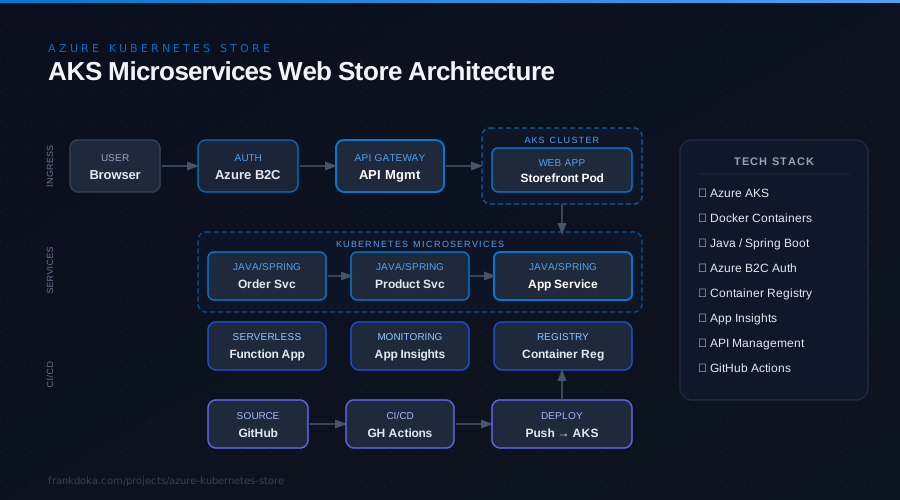
The Full Picture
From here the images get pushed to Azure Container Registry and deployed to AKS through a GitHub Actions pipeline, with Azure B2C handling customer identity and API Management fronting the services. The project overview walks through the complete architecture end to end.