Portfolio Site Rebuild — Part 1: Planning & Stack Selection
by Frank Doka
Portfolio Site Rebuild — Part 1: Planning & Stack Selection
My old site started as the Cloud Resume Challenge — static HTML on S3, CloudFront in front, Lambda visitor counter in back. It proved I could build on AWS, but a single-page resume doesn't scale into a portfolio. I needed project pages, build logs, and room to grow.
Requirements
Before picking tools, I defined what the new site had to do:
- Project showcase — Individual pages with architecture diagrams, code snippets, and repo links
- Blog / build logs — Long-form technical posts with Markdown and syntax highlighting
- Search — Users should be able to find content without browsing every page
- Fast and free — Static generation, global CDN, no server costs
- Easy to update — Drop in a file, push, deployed. No touching application code to add content
- Clean design — Dark theme, minimal, animations that don't get in the way
- Future-proof — Modern tooling that won't need a rewrite in a year
Framework: Next.js 15
I looked at Astro, Gatsby, Hugo, and Next.js. Each has trade-offs:
| Framework | Strength | Why I Passed |
|---|---|---|
| Astro | Great for content sites | Island architecture felt like an unnecessary constraint for React components |
| Gatsby | Powerful plugin ecosystem | Too much GraphQL ceremony for a portfolio |
| Hugo / 11ty | Blazing fast builds | No component-based layouts, limited React ecosystem |
| Next.js 15 | App Router, RSC, MDX | Won — static gen + React + mature ecosystem |
Next.js gave me static generation for performance, React Server Components for flexibility, and file-based routing that maps cleanly to a content site. The experimental View Transitions API support was a bonus — native browser page transitions without extra JavaScript.
Styling: Tailwind CSS v4
Tailwind v4 dropped the JavaScript config file entirely. Everything lives in CSS now:
@import "tailwindcss";

@theme {
  --font-display: "Mona Sans", ui-sans-serif, system-ui, sans-serif;
  --color-neutral-950: #0a0a0a;
}
One @theme block holds all design tokens — colors, fonts, spacing. No jumping between files. The @import "tailwindcss" entry point replaces the old @tailwind base/components/utilities directives.
Content: MDX
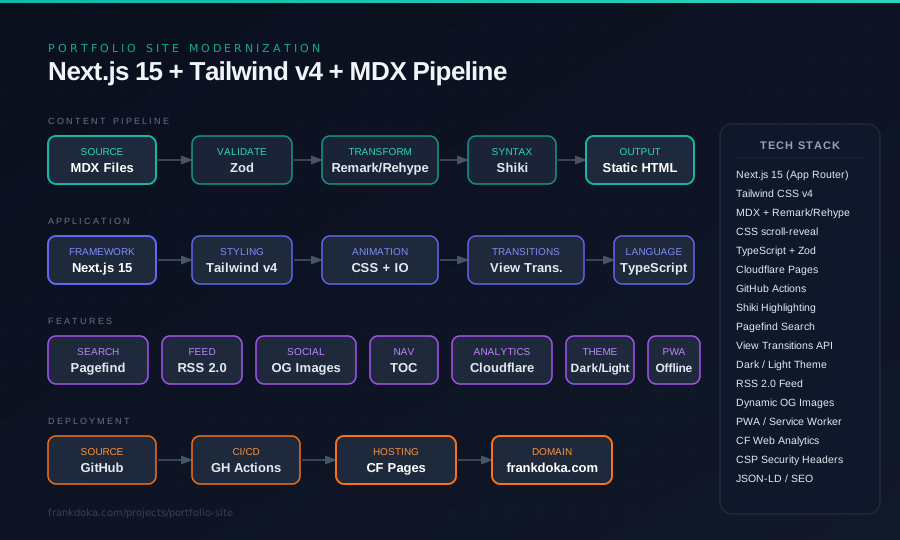
MDX is Markdown with JSX support. Content lives in the repo alongside code — version-controlled, no external CMS, no API calls at build time. The processing pipeline:
MDX → Zod Validation → remarkGfm → remarkMDXLayout → rehypeSlug → rehypeShiki → rehypeUnwrapImages → HTML
- Zod — Schema validation on every metadata export at build time
- remarkGfm — Tables, task lists, autolinks
- rehypeSlug — Generates heading IDs for anchor links and table of contents
- rehypeShiki — Syntax highlighting with the
github-darktheme - rehypeUnwrapImages — Full-width images instead of paragraph-wrapped
- Custom layout plugin — Automatic layout wrapping per page
Hosting: Cloudflare Pages
The old S3 + CloudFront + Route 53 stack worked but was heavy for a static site. DNS was already on Cloudflare, making Pages the natural choice:
- Free tier with unlimited bandwidth and 500 builds/month
- Connect a GitHub repo, set the build command, auto-deploy on push
- Custom domain setup was a single click since DNS was already there
- Preview deployments on every pull request
- Built-in Web Analytics — privacy-first, no cookies, just a script tag
Animations: CSS + View Transitions
Scroll-triggered fade-ins and staggered card reveals run on a small IntersectionObserver hook plus a CSS transition — no animation library, so nothing extra ships to the browser. A component fades and slides into place the first time it scrolls into view.
For page-to-page navigation, the View Transitions API handles smooth crossfade transitions natively in the browser. Next.js 15 supports it as an experimental flag — one line in the config, a few CSS keyframes, and pages transition smoothly. It respects prefers-reduced-motion automatically.
Project Structure
src/
  app/
    page.tsx                 # Homepage
    about/page.tsx           # About page
    blog/[slug]/page.mdx     # Blog posts
    projects/[slug]/page.mdx # Project pages
    experience/[slug]/       # Experience detail pages
    feed.xml/route.ts        # RSS feed
  components/
    layout/                  # RootLayout, Navigation, Footer
    sections/                # Hero, About, Projects, FeaturedPosts
    SearchDialog.tsx          # Pagefind search modal
    TableOfContents.tsx       # Auto-generated heading nav
  data/                      # Structured experience and skills data
  lib/
    mdx.ts                   # MDX loader with Zod validation
    readingTime.ts           # Word count → reading time
Each blog post and project gets its own directory. The MDX file exports metadata (title, date, tags) and the content body. A loader in lib/mdx.ts uses fast-glob to discover files, validates metadata with Zod, and sorts by date.
Next Up
Stack is locked in, dependencies installed. Part 2 covers building the component library, wiring up the MDX pipeline with Zod validation, and laying out the homepage.