Text-to-Speech Serverless App — Phase 1: Frontend & Login System
·1 min read
by Frank Doka
Article
Text-to-Speech Serverless App — Phase 1: Frontend & Login System
Phase 1 establishes the user-facing layer: a React frontend with secure authentication, ready to submit text to the serverless backend built in later phases.
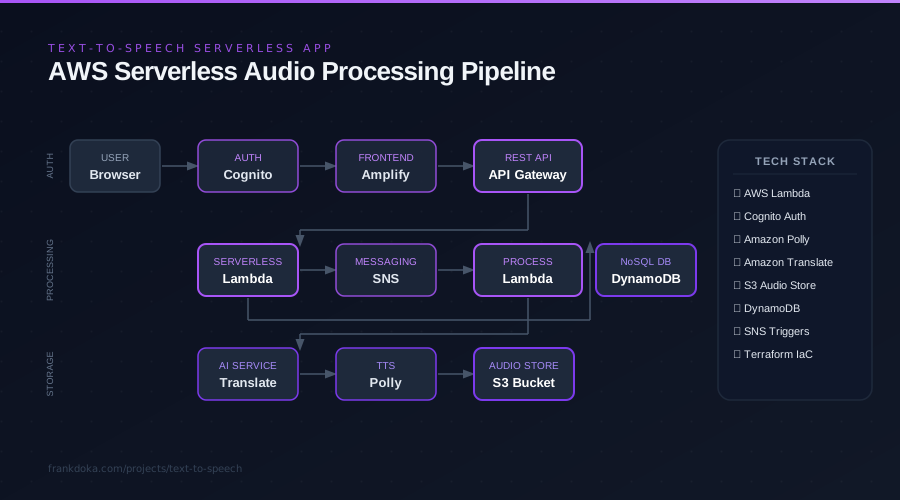
What I Built
- Cognito authentication — Set up a Cognito User Pool for sign-up, sign-in, and JWT token issuance. Only authenticated users with valid tokens can access the API endpoints downstream.
- React frontend on Amplify — Used AWS Amplify to scaffold the React app and integrate the Cognito login UI. Amplify abstracts the token management and auth state, keeping the frontend code clean.
- Text submission form — Input field for text, dropdown for target language selection, and a submit button. This is the core interaction — everything else in the project flows from this form.
Why Cognito + Amplify
Amplify handles the entire auth flow (sign-up, confirmation, sign-in, token refresh) with a few configuration lines. The JWT tokens it manages are passed as Authorization headers to API Gateway in later phases, so the security model is consistent from frontend to backend.
What's Next
Phase 2 builds the serverless backend — API Gateway, Lambda, DynamoDB, and SNS — to receive and store submissions.